How to Find Adult Games on Steam
Steam sells adult games, but it hides most of them by default. Here is how to find adult games on Steam in short: log in, confirm you are an adult and switch on the matching content filters in your store preferences. After that, the "Sexual Content" and "Nudity" tags and normal store search show them. This guide walks through the settings, then explains why the games are hidden and how censored builds and patches work.
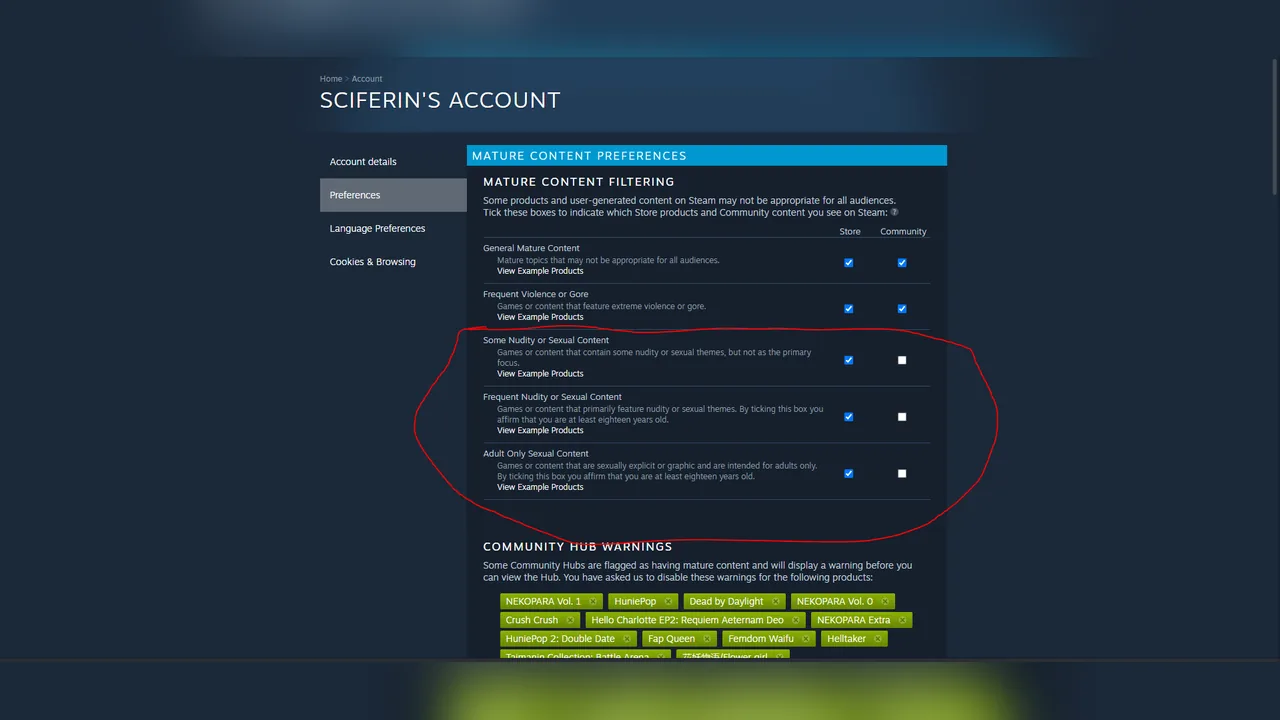
How to enable adult games on Steam, step by step
- Log in to your Steam account. The content preferences live on a login-only page, and while logged out Steam will not let you browse adult tags at all (more on that below).
- Open your store preferences. Go to
store.steampowered.com/account/preferencesin a browser, or open your account menu in the Steam client and look for store preferences. - Find the mature content section. It lists Steam's content descriptors with a checkbox for each. Steam's exact labels on this page can change, so look for the descriptor names listed in the table below.
- Tick the descriptors you want to see. For explicit adult games, the key ones are "Adult Only Sexual Content" and "Frequent Nudity or Sexual Content". Steam asks you to affirm that you are at least 18 before it shows content with either descriptor.
- Save and reload the store. Changes apply to the account you are logged in to, so make sure the browser and the client use the same account.
- Browse by tag. The "Sexual Content" and "Nudity" tags are where to find NSFW games on Steam. Search the store for either tag, then narrow results with genre tags such as visual novel or RPG.
- Pass the age check on each store page. Adult titles show an age check before the page opens. That is normal and does not mean your settings failed.
Tip: if you only want games with some nudity but not fully explicit titles, tick "Some Nudity or Sexual Content" and leave "Adult Only Sexual Content" off. The descriptors are separate on purpose.
Steam adult content settings: the five descriptors
Every game on Steam that has mature content is labeled by its developer with one or more official descriptors. Your preferences decide which of these appear for you. The names and definitions below come from Valve's Steamworks documentation.
| Descriptor | What it means | 18+ affirmation? |
|---|---|---|
| Some Nudity or Sexual Content | Some nudity or sexual themes, but not the main focus | No |
| Frequent Violence or Gore | Violence or gore is frequent | No |
| Adult Only Sexual Content | Sexually explicit or graphic content intended for adults only | Yes |
| Frequent Nudity or Sexual Content | Primarily features nudity or sexual themes | Yes |
| General Mature Content | Mature content not covered by the others | No |
When a store page lists "Adult Only Sexual Content", the explicit material is usually part of the Steam build. When it lists only "Some Nudity or Sexual Content", expect a toned-down version, and check the page for a patch or DLC (see below).
Why adult games are hidden on Steam
Two things keep them out of sight. First, the filter is opt-in: press coverage of the filter's launch in September 2018, for example by Variety, reported that "Adult Only Sexual Content" starts unchecked, and Valve's documentation confirms that users must affirm they are 18 or older to see the two explicit descriptors. We have not found a current Valve help page that states the default, so treat that detail as reported.
Second, adult tags are closed to logged-out visitors. When we checked on September 30, 2026, opening the "Sexual Content" or "Nudity" tag page without logging in redirected to an adult-only category that returned an error. So if a friend's link to an adult tag "does not work", the fix is usually just logging in with the right preferences.
Steam also has rules about what can be sold at all. Its developer onboarding page bans, among other things, adult content that isn't properly labeled and age-gated, and content that may break the rules of Steam's payment processors, card networks and banks, "in particular, certain kinds of adult only content". That last line arrived in July 2025. According to reports, including GamingOnLinux, Valve retired more than 100 adult-only titles from sale at the time. If a game you remember is missing from search, that may be why, not your settings.
Censored builds, adult patches and paid DLC
Finding a game is half the job. The other half is knowing whether the Steam version contains the adult content. There are four common setups:
- Included as sold. The Steam build has everything. Subverse, for example, lists "Adult Only Sexual Content" and needs no patch.
- Free Steam adult patch DLC. Some developers publish a free DLC, often named "Adult Patch", that unlocks the content. Searching the store for "adult patch" returns many of these. Because it installs through Steam, this is the cleanest option.
- Free patch from the developer's website. Some games sell a toned-down build on Steam and host the patch on their official site. HuniePop 2: Double Date works this way, with the patch linked from the game's own website.
- Paid adult DLC. A few games sell the explicit content as an add-on, as Crush Crush and House Party do.
Read the "About this game" section and the DLC list on the store page before buying. If the developer mentions a patch, follow the link from the store page or the official site, never a file from a forum mirror. Our guide on whether Steam adult games are safe covers patch safety in more detail.
How to find adult games on Steam faster once the filter is on
- Combine tags. Pair "Sexual Content" with a genre tag (visual novel, RPG, dating sim) instead of scrolling one giant list.
- Check the descriptor line on each page. It tells you more about the content than the capsule art does.
- Look for demos. Some adult games, such as Karryn's Prison, have a free demo on Steam, which is the easiest way to test performance and content before paying.
- Use a curated list. If you'd rather skip the digging, our picks of the adult games worth buying on Steam note for each game whether it needs a patch.
Troubleshooting: still can't see adult games?
- Tag link goes to an error page. You are logged out, or logged in to a different account in that browser. Log in and try again.
- Settings saved, but results look the same. Reload the store, and check that the explicit descriptors are ticked, not just "Some Nudity or Sexual Content".
- The option is missing or greyed out. Availability can depend on your account and region. We couldn't check every case, so contact Steam Support if the option doesn't appear.
- A specific game has vanished. It may have been removed from sale. Check the developer's site or other stores; itch.io is the usual alternative, and our Steam vs itch.io comparison explains the trade-offs.
FAQ
Are adult games allowed on Steam?
Yes, as long as they are labeled with the right content descriptors and age-gated. Valve's rules exclude some content outright, including sexual images of real people, anything involving minors, and certain adult-only content that conflicts with payment processor rules.
How do I enable adult games on Steam?
Log in, open your store preferences, and tick "Adult Only Sexual Content" and "Frequent Nudity or Sexual Content" in the mature content section. Steam will ask you to confirm you are 18 or older.
Why can't I see the Sexual Content tag?
When we checked, the tag page did not work for logged-out visitors. Log in and enable the matching descriptors, then search again.
Does turning on the filter uncensor games?
No. The filter only controls what the store shows you. Whether a game's build is explicit depends on the developer: some include everything, some offer a free adult patch, some sell adult DLC.
Can I find adult games on Steam without an account?
Not reliably. Adult tags didn't load logged out when we tested, and individual adult store pages show an age check first. An account is the practical requirement.
Looking for the same walkthrough on the other big store? See how to find adult games on itch.io, or go back to all our guides.
Related guides
 How-toAre Steam adult games safe?Are Steam adult games safe? What Steam does and doesn't guarantee: store rules, age checks, the refund window,…
 ComparisonSteam vs itch.ioSteam vs itch.io for adult games: we compare catalogs, censored builds, prices, refunds, updates, payments and…
 How-toInstall on WindowsHow to install adult games on Windows: extract the zip, get past SmartScreen, pick a folder, find Ren'Py and RPG…

 Best listAdult games on SteamThe best adult games on Steam, with what each Steam build contains (uncensored, free official patch or paid DLC),…